Select a language

AI is transforming communication platforms by streamlining workflows and enhancing productivity. Its ability to automatically generate content, analyze data, and provide real-time insights aids employees in managing communication more efficiently through summarization, prompt-based AI assistants, and real-time transcriptions. These tools help employees communicate efficiently, align quickly, and save time for strategic tasks by providing key insights and instant, searchable records.
To assess how well these AI-driven capabilities are performing, we engaged TestDevLab to compare the AI capabilities of several meeting platforms, focusing on the following:
The key AI features evaluated across these platforms were:
A few notes:
TestDevLab (TDL) offers software testing & quality assurance services for mobile, web, and desktop applications and custom testing tool development. They specialize in software testing and quality assurance, developing advanced custom solutions for security, battery, and data usage testing of mobile apps. They also offer video and audio quality assessment for VoIP or communications apps and products for automated backend API, as well as web load and performance testing.
TestDevLab team comprises 500+ highly experienced engineers who focus on software testing and development. The majority of their test engineers hold International Software Testing Qualifications Board (ISTQB) certifications, offering a high level of expertise in software testing according to industry standards and service quality.
For fairness across all platforms, TestDevLab conducted all tests using their own equipment and accounts. A range of typical meeting scenarios were represented through three pre-recorded meetings in English:
Each meeting was designed to simulate realistic business and collaborative environments. The discussions were organic, incorporating technical statements where relevant. Context was a critical factor in meeting selection, ensuring each conversation had a clear topic with actionable outcomes. This allowed for accurate and meaningful summaries that reflected the full scope of the meeting.
The audio sources featured a diverse set of voices, including both male and female participants with various accents and dialects, reflecting the diversity of real-world meetings. To allow accurate and repeatable testing, the following measures were taken:
For the actual testing, the pre-recorded audio files were played back synchronously on individual machines, with each machine connected to the call. This process simulated a live meeting using pre-recorded audio, providing TestDevLab with the ability to repeat each test five times for each platform.
Each machine joined the call via a Chrome browser (version 128.0.6613.85) running on a MacBook Pro M1, allowing TestDevLab to capture the necessary metrics under consistent conditions. Running these tests via a browser helps to properly capture the desired metrics, and as AI processing is done in the cloud or backend and not on the native application, the captured metrics should be the same, whether run on an app, mobile app, or browser.
For each feature tested, TestDevLab captured the most relevant metrics that accurately reflect the feature’s value and provide a comprehensive view of its overall capabilities.
Meeting transcript
The industry-standard methodology for measuring transcript quality is Word Error Rate (WER). This metric calculates the percentage of words that differ between the original (human-generated) transcript and the automatically generated one. WER is expressed as a percentage of errors over the entire meeting duration. Before calculating WER, a specific cleaning process is required: filler words, speaker names, and punctuation are removed from both transcripts. Additionally, numbers are standardized (either as digits or words), and all capitalized letters are converted to lowercase.
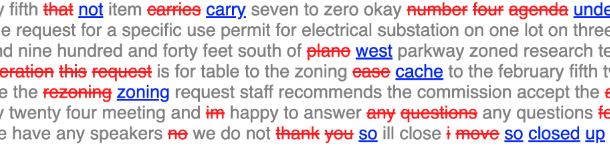
The image below shows a visualization of WER analysis, grey text is the same in both transcripts, red text represents the original transcript (the strikethrough shows that these words are missing in the generated text) and blue text shows the generated transcript replacement.
Beyond WER, TestDevLab also assessed how these errors affect the overall comprehension of the meeting. To address this, TestDevLab developed an LLM-based assistant. This assistant analyzes the differences between the original and generated transcripts, focusing on context, grammar, phrasing, and meaning. The assistant provides both a numerical score (ranging from 0 to 100%) and a detailed explanation, outlining the reasons for the assigned score.
Meeting summary
Unlike meeting transcripts, where the goal is a direct one-to-one match between the human transcript and the AI-generated version, meeting summaries require the AI system to “understand” the content and produce a concise version that highlights the key points and captures the relevant action items. Evaluating the quality of meeting summaries can be subjective, as preferences vary—some may value brevity while others prefer more detailed accounts.
To help provide a fair comparison of summaries across different platforms, TestDevLab developed an LLM Assistant to evaluate summaries based on 11 distinct categories. Each category is individually scored, and the Assistant provides a detailed explanation for the reasoning behind each score. The provided results are then human-validated for accuracy.
Summary evaluation categories:
Conversational AI
To evaluate conversational AI performance during meetings, TestDevLab developed a set of questions tailored to each meeting scenario. These questions were introduced by three participants simultaneously (or two for 2 participant meetings) at different points in the conversation, and the responses were scored on a pass/fail basis. To evaluate the overall capability of the Conversational AI system, TestDevLab introduced questions in different categories:
In addition to the actual response returned by the AI system, TestDevLab also recorded the time it takes to generate a complete response.
The results below show the average for each platform across all three types of meetings (2-person, 4-person, and 16-person). Each meeting was repeated five times, totaling 15 meetings per platform, to provide more accurate results.
Meeting transcription accuracy is crucial, as it is the foundation for all other AI capabilities.
Accurate transcriptions are critical to improving productivity and reducing misunderstandings, whether for record-keeping, sharing knowledge, or simply ensuring that no important detail is missed.
While each platform provides a slightly different methodology for creating and accessing the Meeting transcript, all platforms tested provide a method for generating and saving the transcript.
Word Error Rate (WER)
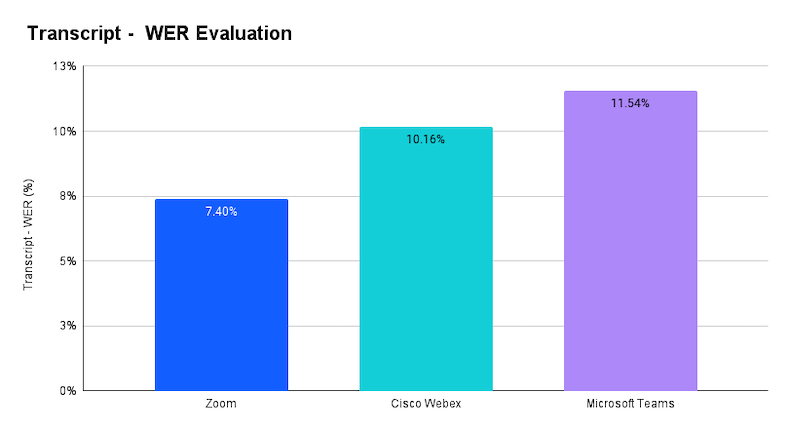
The WER measures how often errors occur in the transcripts produced by the transcript systems, with lower percentages indicating better accuracy. Zoom leads with the lowest WER at 7.40%, followed by Webex at 10.16%. Microsoft exhibits higher WERs at 11.54%. These results suggest that Zoom and Webex are currently the most reliable platforms when it comes to minimizing transcription errors.
When measuring comparatively Zoom’s transcript quality delivers 27% fewer errors compared to Webex and 36% fewer errors compared to Microsoft.
LLM assistant evaluation
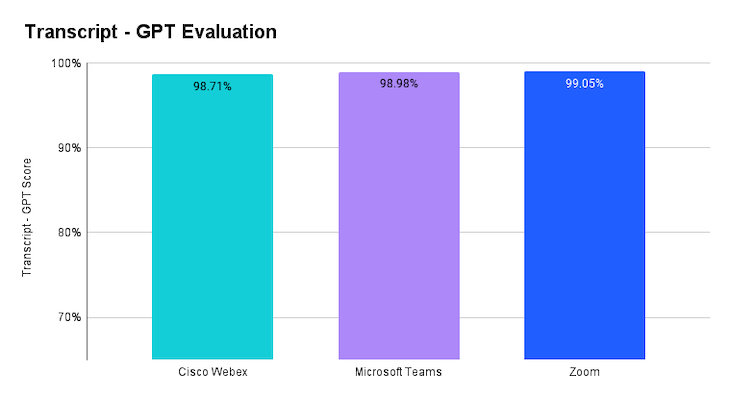
The LLM Assistant evaluates transcriptions based on context, grammar, phrasing, and overall meaning. In the chart, we see a close grouping of strong performance, with all platforms scoring above 98%. Zoom leads with 99.05% accuracy, while Webex comes in at 98.71%. The small variation in these scores suggests that all platforms handle the majority of transcription errors well, with most mistakes involving minor issues like missing filler words or misunderstood terms that don’t significantly affect comprehension.
However, it’s important to acknowledge that in certain cases, even small errors can impact transcription accuracy and usefulness. For instance, a misspelled acronym or meeting participant’s name in project management or technical contexts could lead to inaccurate task assignments or unclear next steps. This highlights the importance of maintaining high accuracy, especially to help users experience the time-saving benefits of no longer taking meeting minutes or having to listen to full recordings.
Meeting summaries are essential for capturing and communicating the key points and action items from a discussion. They help streamline decision-making, clarify next steps, and serve as quick references for both attendees and those who couldn’t participate. Summaries allow participants to easily recall important details and provide non-attendees with a concise overview of the discussion without having to sift through the full transcript or recording. This makes accurate and well-structured summaries vital for maintaining productivity and keeping everyone informed.
In this evaluation, we tested two summary capabilities within Microsoft Teams: the Intelligent Recap feature, available with a Teams Premium or Microsoft 365 Copilot license, and the prompt-based summary generation capability of Microsoft Copilot AI Assistant in Teams Meetings. Since Copilot AI Assistant is only able to generate summaries based on prompts, we prompted Copilot to create a summary and action items at the conclusion of the meeting.
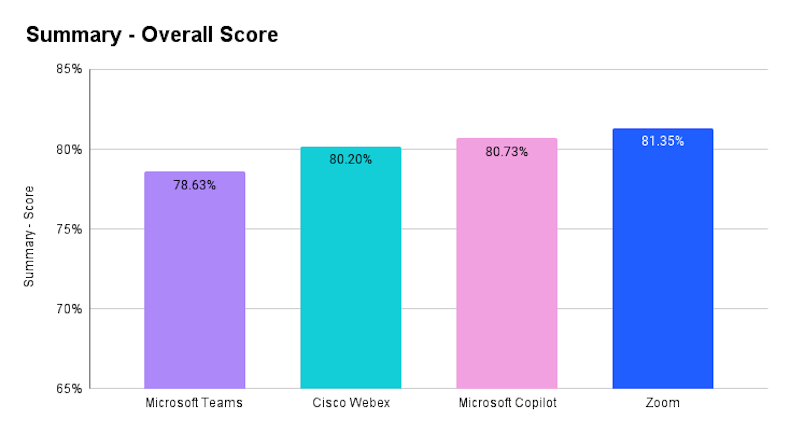
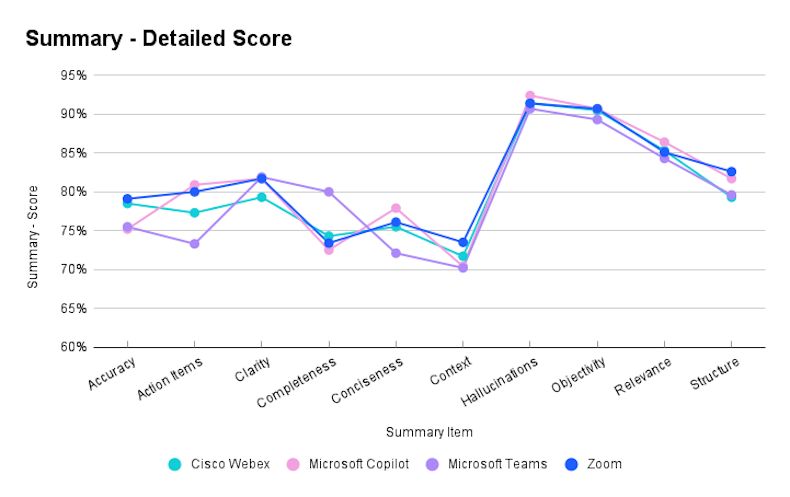
When looking at the overall scores, Zoom leads with a score of 81.35%, followed closely by Copilot at 80.75%, Cisco Webex at 80.20%, and Microsoft Teams (Intelligent Recap) with 78.63%. These results suggest that most platforms deliver solid summary features, though there is still room for improvement.
To better understand the overall scores, we analyzed each of the assessed metrics. The chart below reveals, for example, that Zoom and Webex deliver more accurate summaries than Teams or Copilot, with Zoom showing 16% fewer errors compared to Copilot. In the Action Items category, Zoom and Copilot take the lead, followed by Webex and Teams.
The LLM Assistant also provided valuable detail of the summary quality (representative examples):
In-meeting conversational AI plays a crucial role in enhancing productivity by providing real-time assistance, generating action items, answering queries, and improving participant engagement. Fast and stable responses from AI systems ensure smoother interactions and allow users to focus on discussions without interruptions or delays.
In this test, TestDevLab posed the same question to the conversational AI from 3 participants (2 for the two-participant call) at specific intervals during the meeting, measuring both the content of the responses received and the time taken to generate a complete response.
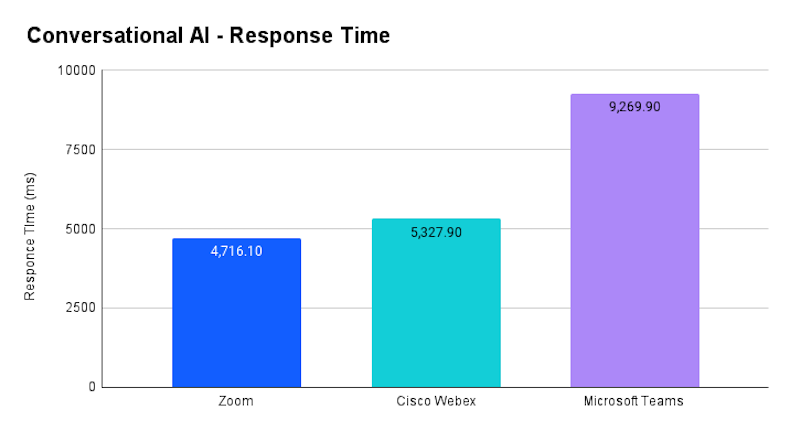
As shown in the Average Delay chart Below, Zoom demonstrates the fastest response time, with an average delay of 4716.1 ms, followed by Cisco Webex at 5327.9 ms. In contrast, Microsoft Teams exhibits a significantly higher delay, averaging 9269.9 ms. This indicates that Zoom provides quicker responses during meetings, which is particularly advantageous when meeting participants require real-time feedback or assistance.
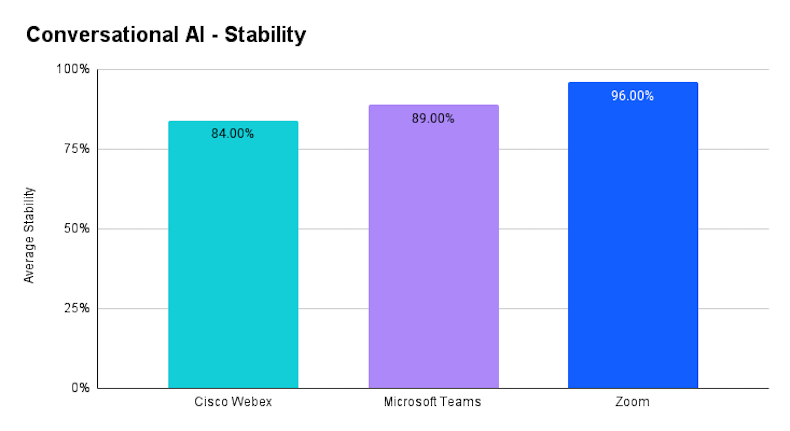
In terms of Prompt Response Stability (the ability of all participants to receive a similar answer), Zoom once again leads, achieving 96% stability, followed by Microsoft Teams at 89% and Cisco Webex at 84%. Higher stability indicates that Zoom's AI consistently delivers reliable responses to all participants, providing a smoother experience during meetings.
AI is playing a pivotal role in transforming communication platforms by automating key tasks such as meeting transcription, summarization, and real-time assistance. The evaluation conducted by TestDevLab highlights Zoom as a leader in AI performance, with superior transcription accuracy, faster in-meeting question response times, and more stable conversational AI capabilities compared to tested competitors. These findings underscore the importance of AI-driven tools in enhancing productivity, facilitating better communication, and helping teams stay aligned during meetings. While all platforms offer valuable features, the results indicate that currently, Zoom stands out in delivering more efficient and reliable AI meeting capabilities.